
• Login
  • Register
  • Search
  1. Dashboard
  2. Forum
    1. Unresolved Threads
  3. Members
    1. Recent Activities
    2. Users Online
    3. Team-Mitglieder
    4. Trophy
    5. Search Members
  4. Lexicon
This Thread
  • Everywhere
  • This Thread
  • This Forum
  • Articles
  • Pages
  • Forum
  • Lexikon
  • More Options
  1. Informatik Forum
  2. Webmaster & Internet
  3. Development

Laravel Translation. Wie am besten?

  • PixelPatron
  • August 6, 2024 at 7:25 PM
  • Thread is Resolved
  • PixelPatron
    20
    PixelPatron
    github.com/pixelpatron90
    Reactions Received
    166
    Points
    4,146
    Posts
    735
    Einträge
    3
    • August 6, 2024 at 7:25 PM
    • #1

    Grüsse meine lieben,

    wollte mal wissen von denjenigen die mit Laravel arbeiten wie ihr das mit der Translation umsetzt.

    Was ist eher geeignet?

    @lang('Ich schreibe meinen Text einfach so!')

    @lang('base.ich_schreibe_meinen_text_so')

    Der Grund warum ich frage ist ich würde gerne die Möglichkeit nutzen und meine Übersetzungen in der Datenbank verwalten. Mit dem gedachte Spatie Plugin haut er mir raus das der Key zu lange ist wenn ich Variante 1 nutze. Variante 2 ist mir einfach zu aufwendig. Bei variante 1 kann ich einfach schreiben und gut ist ..

    bin gespannt

    :red_heart:

    pixelpatron-100000?style=for-the-badge&logo=X&logoColor=white&labelColor=000000&color=FF0000 pixel_patron-100000?style=for-the-badge&logo=Discord&logoColor=white&labelColor=000000&color=FF0000

    EVARIOO - DISCORD

  • Go to Best Answer
  • Syntafin
    27
    Syntafin
    LISTstack Dev
    Reactions Received
    508
    Points
    7,962
    Trophies
    2
    Posts
    1,446
    • August 6, 2024 at 9:22 PM
    • #2
    Code
    {{ $t('form.save') }}

    Zu Blade Zeiten aber wäre es @lang('user.save') geworden, was dann einfach "Speichern" oder "Save" in Englisch wäre.

    A red dragon falls from the heavens... Ah, that memory has been lost. A shame. It was a favorite of mine...

  • PixelPatron
    20
    PixelPatron
    github.com/pixelpatron90
    Reactions Received
    166
    Points
    4,146
    Posts
    735
    Einträge
    3
    • August 6, 2024 at 10:24 PM
    • #3

    Okay und wie merkst du dir das alles? Oder hast du nen Plugin das dir die String später in eine json setzt? :grinning_squinting_face:

    pixelpatron-100000?style=for-the-badge&logo=X&logoColor=white&labelColor=000000&color=FF0000 pixel_patron-100000?style=for-the-badge&logo=Discord&logoColor=white&labelColor=000000&color=FF0000

    EVARIOO - DISCORD

  • Syntafin
    27
    Syntafin
    LISTstack Dev
    Reactions Received
    508
    Points
    7,962
    Trophies
    2
    Posts
    1,446
    • August 7, 2024 at 8:21 PM
    • #4

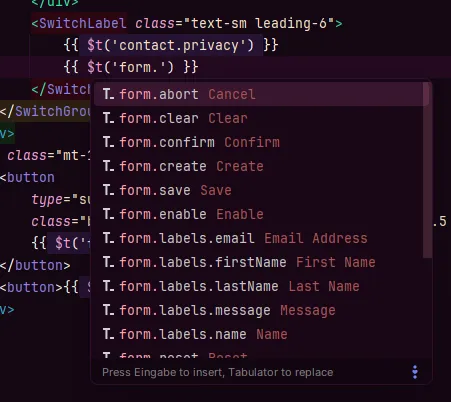
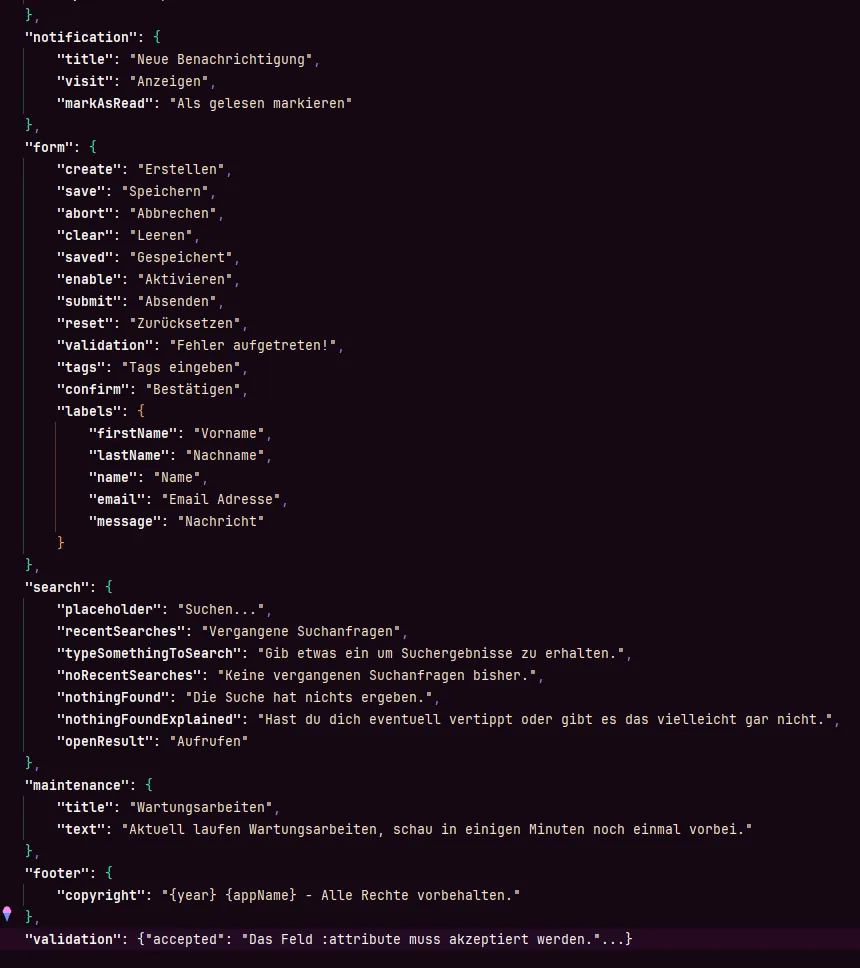
    Ich bekomme die als Autovervollständigung angezeigt, ähnliches gibt es auch für zB VS Code (war Teil des Laravel Paketes), ansonsten ja es ist eine riesige JSON Datei bei mir :grinning_squinting_face:

    Sollte ich mal eine Möglichkeit finden das anders zu lösen, ist das auf alle Fälle etwas das ich tun werde.

    A red dragon falls from the heavens... Ah, that memory has been lost. A shame. It was a favorite of mine...

  • PixelPatron
    20
    PixelPatron
    github.com/pixelpatron90
    Reactions Received
    166
    Points
    4,146
    Posts
    735
    Einträge
    3
    • August 7, 2024 at 8:38 PM
    • #5

    Ah. und warum nutzt du mittlerweile wieder t() statt @lang?

    pixelpatron-100000?style=for-the-badge&logo=X&logoColor=white&labelColor=000000&color=FF0000 pixel_patron-100000?style=for-the-badge&logo=Discord&logoColor=white&labelColor=000000&color=FF0000

    EVARIOO - DISCORD

  • Syntafin
    27
    Syntafin
    LISTstack Dev
    Reactions Received
    508
    Points
    7,962
    Trophies
    2
    Posts
    1,446
    • August 7, 2024 at 9:25 PM
    • Best Answer
    • #6

    In Blade Templates würde/verwende ich weiterhin @lang, das ist nur kein Blade Template :grinning_face_with_smiling_eyes:

    A red dragon falls from the heavens... Ah, that memory has been lost. A shame. It was a favorite of mine...

  • PixelPatron August 7, 2024 at 9:30 PM

    Selected a post as the best answer.
  • PixelPatron
    20
    PixelPatron
    github.com/pixelpatron90
    Reactions Received
    166
    Points
    4,146
    Posts
    735
    Einträge
    3
    • August 8, 2024 at 10:01 PM
    • #7

    Ich verstehe nur nicht warum das json bei mir so wie es bei dir aussieht nicht funktionieren mag:

    Code
    {
    "name": "Das geht!",
    "form": {
    "lastName": "Nachname",
    "name": "Name"
    }
    }

    Wobei es nur verschachtelt nicht geht ..

    pixelpatron-100000?style=for-the-badge&logo=X&logoColor=white&labelColor=000000&color=FF0000 pixel_patron-100000?style=for-the-badge&logo=Discord&logoColor=white&labelColor=000000&color=FF0000

    EVARIOO - DISCORD

  • Syntafin
    27
    Syntafin
    LISTstack Dev
    Reactions Received
    508
    Points
    7,962
    Trophies
    2
    Posts
    1,446
    • August 9, 2024 at 6:08 AM
    • #8

    Mal eben nachgeschaut und nein, bei JSON wird kein Nested unterstützt :) .

    Meine JSON Dateien sind auch ausschließlich für das Frontend gedacht.

    A red dragon falls from the heavens... Ah, that memory has been lost. A shame. It was a favorite of mine...

  • PixelPatron
    20
    PixelPatron
    github.com/pixelpatron90
    Reactions Received
    166
    Points
    4,146
    Posts
    735
    Einträge
    3
    • August 9, 2024 at 12:41 PM
    • #9
    Quote from Syntafin

    Mal eben nachgeschaut und nein, bei JSON wird kein Nested unterstützt :) .

    Ich habe eine Lösung gefunden die auch wunderbar mit nested arbeitet. Poste sobald ich etwas Zeit finde die Lösung für Laravel 11 :)

    Lösung für Laravel Lang JSON nested Files:

    1) Erstelle eine Translator Klasse unter app/Translation/Translator.php

    Folgender Inhalt für Translator.php
    PHP
    <?php
    
    namespace App\Translation;
    
    use Illuminate\Support\Arr;
    use Illuminate\Translation\Translator as BaseTranslator;
    
    class Translator extends BaseTranslator
    {
        /**
         * @param $key
         * @param array $replace
         * @param $locale
         * @param $fallback
         *
         * @return array|string|null
         */
        public function get($key, array $replace = [], $locale = null, $fallback = true)
        {
            $results = parent::get($key, $replace, $locale, $fallback);
    
            // If the key does not contain nested translation
            // or the result did not return the key back, then it's okay
            if (!str_contains($key, '.') || $results !== $key) {
                if (is_array($results)) {
                    return $key;
                }
    
                return $results;
            }
    
            $locale = $locale ?: $this->locale;
            $line = Arr::get($this->loaded['*']['*'][$locale], $key);
    
            // Handle fallback to default language
            if (!isset($line) && $fallback && !empty($this->getFallback()) && $locale !== $this->getFallback()) {
                $this->load('*', '*', $this->getFallback());
                $line = Arr::get($this->loaded['*']['*'][$this->getFallback()], $key);
            }
    
            return $this->makeReplacements($line ?: $key, $replace);
        }
    }
    Display More

    2) Hänge die Klasse in app/Providers/AppServiceProvider.php an

    Folgender Inhalt für AppServiceProvider.php
    PHP
    <?php
    
    // top code
    
    public function boot(): void
        {
            $this->app->extend('translator', function ($service, $app) {
                $translator = new Translator($service->getLoader(), $service->getLocale());
                $translator->setFallback($service->getFallback());
    
                return $translator;
            });
        }
        
    // bottom code
    Display More

    Jetzt kannst du mit

    Code
    {{ __('nested.key') }}

    oder

    Code
    @lang('nested.key')

    deine Übersetzungen in deiner Laravel App abrufen. Beachte das du deine Lang Files nun zb als de.json speicherst.

    Code
    {
    	"form": {
    		"label": {
    			"lastName": "Last name",
    			"firstName": "First Name"
    		}
        },
    }

    pixelpatron-100000?style=for-the-badge&logo=X&logoColor=white&labelColor=000000&color=FF0000 pixel_patron-100000?style=for-the-badge&logo=Discord&logoColor=white&labelColor=000000&color=FF0000

    EVARIOO - DISCORD

    Edited 4 times, last by PixelPatron (August 9, 2024 at 5:54 PM).

  • Informatik-Forum
    4
    Informatik-Forum
    Points
    110
    Posts
    22
    • August 9, 2024 at 7:18 PM
    • #10

    evarioo hat das Thema gepusht.

Participate now!

Don’t have an account yet? Register yourself now and be a part of our community!

Register Yourself Login

  1. Privacy Policy
  2. Legal Notice
Website-Design: Fury - © NetzLiving GmbH